


Semantic HTML
Overview
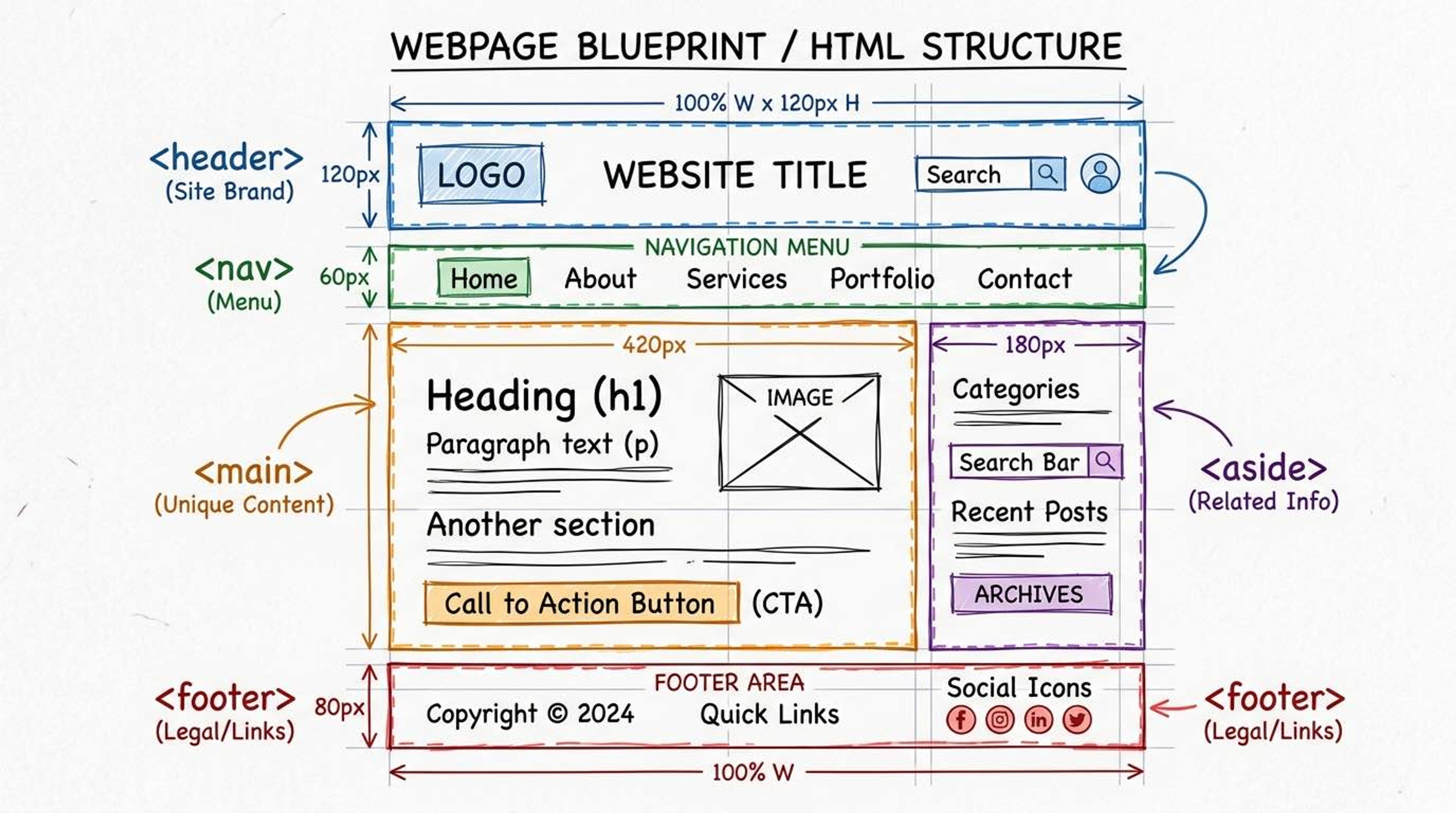
Semantic HTML means using tags that clearly describe their meaning to both the browser and the developer. Instead of putting everything inside generic `<div>` tags, we use descriptive tags like `<header>`, `<nav>`, `<article>`, and `<footer>`.
Why does this matter? First, Search Engine Optimization (SEO). Google can read your page and instantly know which part is the main article and which part is just the footer. Second, Accessibility. Screen readers use semantic tags to help blind users quickly jump to the navigation or the main content.
Syntax
Before HTML5, developers would write `<div id="header">`. Now, we just use the `<header>` tag. The same applies for `<nav>` (navigation links), `<main>` (the primary content of the page), and `<footer>` (the bottom section).
<body>
  <!-- The top bar of the website -->
  <header>
    <h1>My Tech Blog</h1>
    <nav>
      <a href="/">Home</a>
      <a href="/about">About</a>
    </nav>
  </header>

  <!-- The unique content of this specific page -->
  <main>
    <h2>Welcome to my blog</h2>
    <p>This is where the magic happens.</p>
  </main>

  <!-- The bottom bar of the website -->
  <footer>
    <p>© 2025 Copyright</p>
  </footer>
</body>
Inside your `<main>` tag, you can use `<article>` for independent, self-contained content (like a blog post, a news story, or a forum post). If you took the `<article>` out of the page and put it on another site, it would still make complete sense.
You can use `<section>` to group related content together (like chapters in a book).
<main>
  <!-- A standalone blog post -->
  <article>
    <h2>Understanding React Hooks</h2>
    <p>Hooks let you use state in functional components...</p>
  </article>

  <!-- Another standalone blog post -->
  <article>
    <h2>CSS Grid Basics</h2>
    <p>Grid is a 2D layout system...</p>
  </article>
</main>
Common Pitfalls
- <main> must appear only ONCE per page and should contain the primary, unique content of that page. Don't put sidebars or global navigation inside <main>.
- Don't use <section> just as a styling container to add padding or margins — use a <div> for that. <section> implies a thematic grouping of content.
Real-World Example
A complete semantic page layout with a sidebar (aside):
<body>
  <header>
    <nav>
      <a href="/">DevNotes</a>
      <a href="/blog">Blog</a>
    </nav>
  </header>

  <main>
    <article>
      <header>
        <h1>Understanding Semantic HTML</h1>
        <time datetime="2025-06-13">June 13, 2025</time>
      </header>
      <p>Semantic tags improve accessibility...</p>
    </article>

    <!-- Tangentially related content (like a sidebar) -->
    <aside>
      <h2>Related Articles</h2>
      <ul>
        <li><a href="/css">Learn CSS</a></li>
      </ul>
    </aside>
  </main>

  <footer>
    <p>© 2025 DevNotes.</p>
  </footer>
</body>